CheySecondLife

  • Subscribe to our RSS feed.
  • Twitter
  • StumbleUpon
  • Reddit
  • Facebook
  • Digg

Tuesday, January 29, 2013

The Challenge

Posted on 2:02 PM by Unknown


The Challenge

Written 30 January, 2012

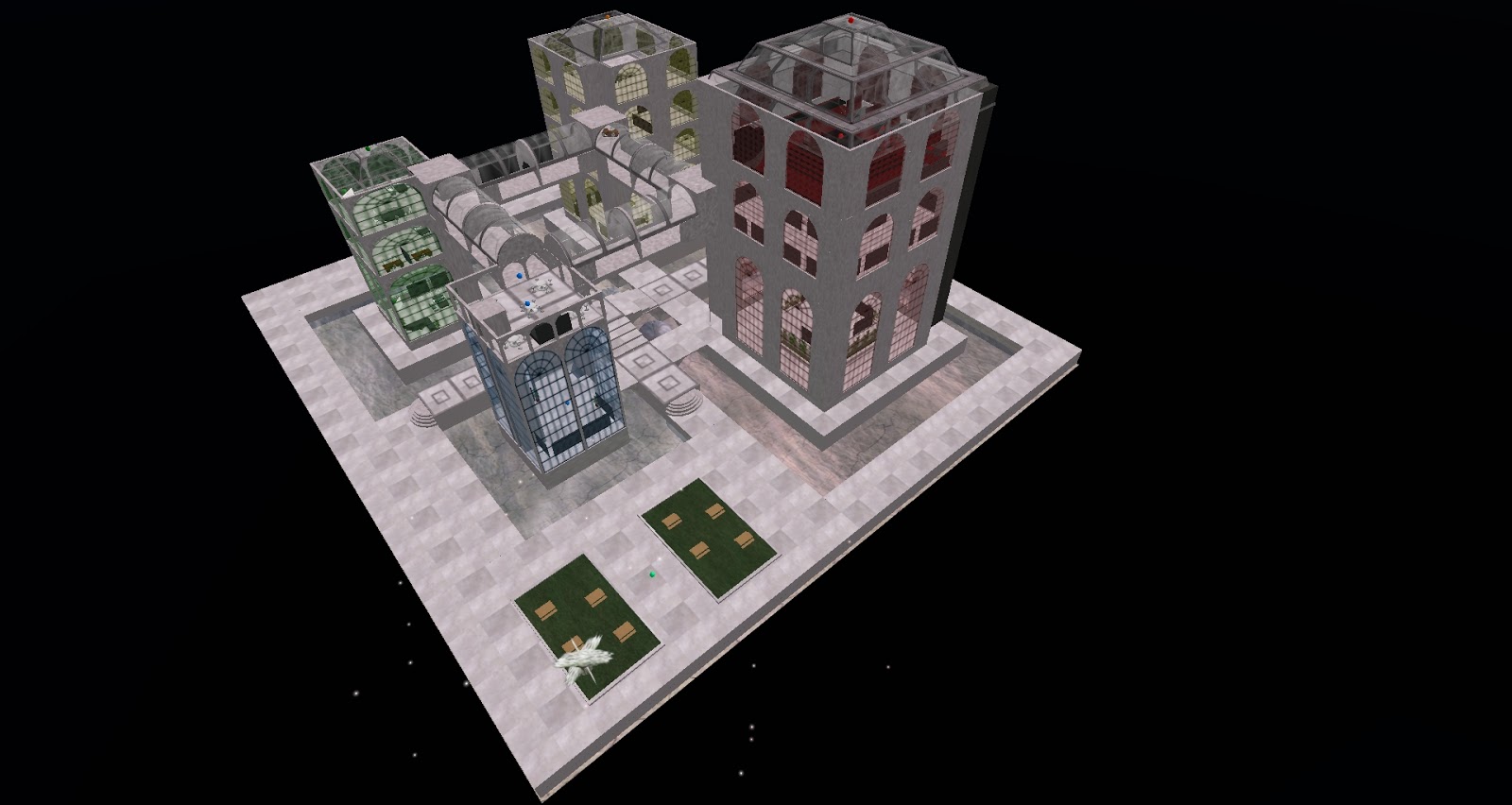
The challenge: recreate a 1000-prim building complex from a tiny no-mod model. The scale of the model is unknown, but seems to be somewhere between 1:8 and 1:10. Because of the no-modify status, the textures used are unknown and dimensions of the prims are not known.

The model dates to April, 2008. The creator is probably no longer active in Second Life; she's not responding to notecards or IMs from the model's owner, her blog hasn't been updated since 2008, and her store is gone.The owner, who has just bought a sim, needs the full size version recreated, and sooner rather than later.

Scar Ayres did the work on the model and I would prefer she dig the model out of inventory, reset permission to allow modification, and make some money by re-selling it to the owner. It was my suggestion he try to contact her.

Since she's not responding, and since the owner paid for the model, I don't see an ethical problem with making a full-size copy. Still, I would rather she check in. If anyone reading this knows how to contact Scar Ayres, please IM me in world.

More pictures below the fold.


Read More
Posted in | No comments

Sunday, January 13, 2013

Sweetie and Chey Have a RL Adventure

Posted on 4:30 PM by Unknown

Sweetie and Chey Have a RL Adventure

Written 13 January, 2013

Yesterday Sweetie and I left her fortress of solitude (yes, yes, I know it's not much of a fortress of solitude if she let's her girlfriend hanging around, but I do the cooking, so she puts up with me) 30 miles outside New York and caught the train into the city. Our coach was a double-decker, my first, and I thought it was cool.

An hour later we changed trains at Secaucus (the only reason I can think of to ever go to that part of New Jersey) and in fifteen minutes we were at Penn Station.


Think people sleeping in the terminal, bad musicians playing pop standards, badly, people in all manner of dress, and one hundred different storefronts all selling cardboard pretzels.


We found our way to the subway and rode the 3 train to Harlem, where we were invited to a brunch for those associated with a book in which I will have a chapter. We grazed and chatted with a lot of mostly young folks for a couple of hours, and then took our leave.

There were a lot of soul food restaurants on the way back to the subway, but Sweetie, who had had a flu shot the day before, was feeling queasy, so I reluctantly faced away from the collard greens and ham hocks and descended to catch the 3 train again.


We disembarked at Times Square and caught the H train to 6th Avenue so we could check out the F.A.O. Schwarz toy store. It was all we expected. A doorman outfitted in a nutcracker soldier uniform bowed and opened the door for us.


Inside there was a profusion of stuffed animals, small, large, and huge, and then a Willy Wonka candy wonderland. Upstairs there were electric trains, magicians, hovering helicopters, and what has to be the world's best Lego display. There was a full-sized Batman a bounty hunter from Star Wars, and an F.A.O. Schwarz toy soldier.


There were any number of doll displays, dollhouses the size of small apartments, board games, fossils, mineral specimens as big as footballs, hula hoops, Erector sets, action figures, toy cars, yo-yos, and books of every description.

There were a lot of children present, and some had face-paint of the finest order. Others seemed to be in a daze from too much stimuli. I know I almost was.

Sweetie bought a deck of playing cards with Tim Burton cartoon characters on them, and I bought a three-pack of cardboard airplanes that return to your hand no matter how they're thrown (see the plain here).


On our way out I had to steel my reserve to walk past a display of giant Hershey bars.

Next door was the world's largest and only 24-hour Apple store. It was easy to spot: it was a giant transparent cube!


The store was way past crowded. At all times t least two hundred people were on the stairway into the entrance.The stair spiraled downward about fifty feet and had no visible means of support.


Since our knees were worn out from the many steps we had negotiated (New York is not the world's most accessible city, believe me!), we looked for an escalator. There was no escllator. Inside the stairwell there was a ultramodern elevator which consisted of a plastic tube and a disc to stand on, but it was out of service.

Sweetie pointed out a young man with an Apple log on his shirt and I told him we didn't feel up to negotiating the stairs. He directed us to another employee who led us into the adjacent General Motors building, through vacant halls, and down an escalator to the back door of the Apple Store.

Heading for the subway we passed a line of carriages at the south end of Central Park. Before I knew it Sweetie had engaged a hackney and we were riding through the park huddled under a blanket to ward off the cold.


It was the perfect time for a ride. We snuggled against one another and marveled at the fog that covered the top parts of the buildings.


There was nothing left to do but to go back to the Fortress of Solitude. Except--

"Are you hungry yet?" I asked, looking about for some place to eat. 5th Avenue was eerily empty of food pushcarts and storefront eateries. I needn't have worried.

"Still queasy," Sweetie said.

The last time I was in the city I had staked out an interesting looking deli on Times Square. We duly arrived at the Times Square subway stop, but decided to push on rather than having to buy another subway ticket.

Back at Penn we had a snack. I looked at all the cardboard pretzels and chose McDonalds. I was that hungry.

One McDouble later we rode the train to Secaucus, where we had to wait an hour and a half for a train home. Then, when we disembarked, the machine that would validate our parking ticket wouldn't accept my quarters because someone had plugged up the slot. Parking cost $2, but we had only one one dollar bill. I was ready to snap off the wooden bar so we could leave, but Sweetie prevailed upon me to first ride the elevator up to the mezzanine to see if there was another machine.

Fortunately there was, and fortunately the first machine hadn't timed out, robbing me of our only dollar. We were able to exit, and fifteen minutes later we were back at the Fortress of Solitude, exhausted.

And that was our big RL adventure.


Read More
Posted in | No comments

Sunday Night Fireworks Over Whimsy

Posted on 2:52 PM by Unknown

Read More
Posted in | No comments

Friday, January 11, 2013

I Still Use My Mystitool

Posted on 8:18 AM by Unknown
Written 11 January, 2013

I Still Use My Mystitool

Back in 2006 I bought Sweetie a Mystitool for Christmas-- and since I was intrigued, I bought another for myself.

Sweetie wears her Mysti sporadically these days, but I always keep mine on.

Nowadays some of the Mystitool's functionality is redundant, but I still find it useful in a number of ways.

Here are some things you can do now without gadgets:


Fly to any height. In the old days avatars could fly no higher than 150 meters or so without wearing an assistive device like a flight feather. It was a limitation that was silly even then, and became more so when build height was increased from 768 meters to 4096. Nowadays you can achieve a stable hover as high as 4096 meters with no device.

I still keep the Mysti's flight assist on. I can hover at any altitude and can set my flight speed to be faster than the unassisted speed. The Plaid setting is way fast!

Know Who's Around. The Radar in Phoenix and Firestorm will tell you who is on the sim and how far away they are from you. You can set the radar to tell you who is coming in or going out of chat and shout distance and who has entered or left the sim, and you can click on an avatar in the Radar tab and, if they're within draw distance, take your camera right to that person.

The Mysti shows avatars within 96 meters at lower right in hovertext and announces whenever an avatar comes within chat distance. I keep this functionality turned on because I find it keeps me oriented. I always know who's around without opening a window. Besides, no one can sneak up on me.

You can scan the sim and determine the number of avatars present and their locations.This was once done with probes and took about 30 seconds but now the Mystitool uses the Radar functionality and provides instant results.

You can also scan for avatars' UUIDs.

Teleport to Camera. Phoenix and Firestorm will allow you to teleport to the location of your camera. This is handy when I'm shopping and spot something one hundred meters and two or three rooms away. I don't have to wander about looking for the item.

I still sometimes use the Mystitool's Tp2Cam command.

Easily Find Favorites. Phoenix, Firestorm, and the Linden viewer all allow you to display a favorites bar at the top of the screen. I keep it turned off to save display space and search inventory. I've never used the Mystitool's favorites function.

The Mystitool does a hundred other handy things:

Rez objects from its inventory. You can put any copyable object in the root prim and rez it upon command (provided build is turned on on the land.

Rez either of two pose stands.

Rez a handy table that creates a new chair whenever someone sits down. The table can be customized and set to almost any size.

Rez a handy building platform. The owner can put up fences to keep avatars from falling off or completely enclose the platorm.

Rez a vehicle to take the owner and friends to the sky, where a platform is created.

Rez a skydiving platform. This will take you and your friends as high as 4000 meters, where it will disappear, throwing you into free fall.

Rez Linden plants.

Rez a chair that will follow you or another avatar about. This is handy when you or a friend has a weak computer that makes it difficult for them to move about.

Rez a camera positioner that will allow you to keep your camera focus fixed.

Track collisions.

Allow you to stand on another avatar's head. This is handy when you lose your friend while exploring. Functionality to 96 meters.

Create a particle beam that will lead you to your friends. Range is 96 meters.

Give you the coordinates of any avatar within 96 meters.

Allow you to mimic an avatar or object. You can, for instance, make your flying monkeys say "Flying Monkeys: We fight with poop!!"

Send a popup window to another avatar (96 meters limit).

Store your teleport destinations and allow you to easily recall them.

Show your favorite landmarks.

Listen on any channel(s).

Listen to object chat.

Scan for bugs and listeners.

Identify owners of chatty objects.

Set your Radio and Media URLS.

Catch URLS in chat and, if you wish, open a window on your browser.

Remind you to take a break.

Create cute poofy particles when flying. Colors are customizable.

Make a gentle facelight.

Ban, unban, eject, unsit, or teleport home avatars from your land. If the avatar isn't within 96 meters you can ban or unban by key.

Determine how many prims a plot of land can hold or how much land is needed for a specified number of prims.

Display random quotes.

Give a warning when sim stats or time dilation fall below user-specified levels.

Make your avatar resistant to bumps and mild pushes with Movelock.

Create a physical vehicle that makes you immune to pushes of any strength and allows you to walk through solid objects.

Stop unwanted animations.

Make facial expressions.

Create a relay that will tell you who is on your land while you're away.

Offensive functions allow you to kill avatars on damage-enabled land (this simply transports them to their home), trap them, drag them, or toss them about for sixty seconds. Before Havok 4.0 there was an orbit function that allowed you to instantly sent avatars millions of meters into the air, high enough to knock off their attachments and distort them. Needless to say, these functions must be used with permission of the avatars killed, trapped, dragged, or tossed so as not to violate the Terms of Service.

Pop open the Owner's Manual notecard. Considering all the Mystitool's functionality, you'll need it. I still do, after all these years.

The Mystitool allows you to set limits on most of its functions and all can be turned on or off. Unwanted functions can be removed from the HUD (and reinstalled later, if you wish).

The Mysti can be put to sleep when you're in a crowded area, but the newest version is way more efficient than it once was.

So, you see, the above is why I still keep my Mystitool on.

You can buy the Mystitool for $423L on the Second Life Marketplace or for $396 at Mystikal Cookie's store on the Blumfield sim. There's also a free version (functionality is limited).


Read More
Posted in | No comments

Outfits Not Searchable?

Posted on 7:19 AM by Unknown


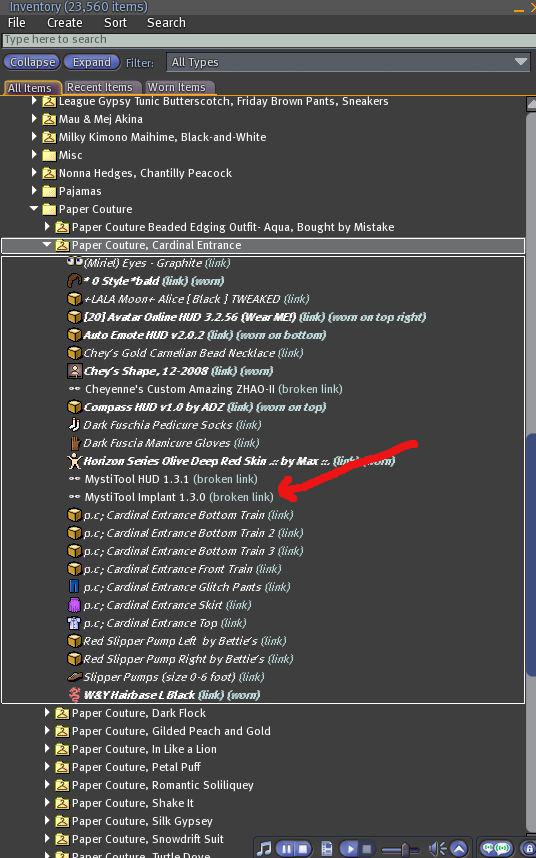
Last night I discovered I couldn't search for broken links in the My Outfits folder.

I include my HUDs in every outfit, and since I have a new version of the Mystitool the links are now all broken.

I was unable to search using the terms BROKEN LINK and Mystitool.

How unfortunate! Now I must go through every outfit and delete the broken links.

Maybe the folder is searchable with Firestorm and the official Linden viewer. I sure hope so.


Read More
Posted in | No comments

Thursday, December 20, 2012

All My Posts About Inventory

Posted on 6:39 AM by Unknown
All My Posts About Inventory

 20 December, 2012

Over the years I've written quite a few posts about inventory control-- including the two just before this post. Some are serious, some just wacky.

Here's a list:

Semi-Serious

17 December, 2012   Inventory Control, Part II

16 December, 2012   Inventory Control, Part I

19 March, 2012         I Found it in the Sock Drawer

23 October, 2008      Inventory Control, Revisited

23 October, 2008      Inventory: Some Hints for Management

3 September, 2008    Inventory Count: 17,363

1 December, 2007     Working on Inventory

8 March, 2007           Inventory Control


Just Plain Wacky

16 February, 2009     When Interventions Go Wrong: II. The Hearing Continues

12 February, 2009     When Interventions Go Wrong: I. The Competency Hearing

10 February, 2009     Intervention!

9 February, 2009       Sweetie's Inventory Malfunction

7 February, 2009       Inventory Obsessive Disorder

4 April, 2007             Inventory Leak

Read More
Posted in | No comments

Monday, December 17, 2012

Inventory Control: Part II

Posted on 7:42 PM by Unknown
Inventory Control

Part II

Written 17 December, 2012

What was I saying?

Oh, yes. So, by using the inventory search filters you can seek and destroy unwanted scripts, landmarks, sounds, gestures, animations, and notecards. Terms like about, unpack, open, rez, and thank will root them out. If you're a big shopper, you'll be surprised how many  will turn up.

Oh! And search bald. You might find hundreds of bald caps. You need only one.

Although there WAS that one time my one and only bald cap went rogue.

Type float, too, as it will show all those floating text scripts in the boxes you bought. And new script, and delete, free, invitation, join, t-shirt


6. Remove duplicates of copyable items.

Unless you've modified it in some way or have removed the original from your inventory, there's absolutely no reason to take a copyable item into inventory. Zap the duplicates. If you find twelve copyable R2D2s in your Robots> Star Wars> Utility Droids folder, you'll need keep only one.

You'll find some copy/mod items come back into your inventory as no copy, no mod, or no copy/no mod. That's due to settings on scripts, sounds, or other objects in their inventories. Be sure to delete those and not your original item.

7. Zap all those calling cards.

If you've not already zapped them, you'll find calling cards for hundreds of people in the Calling Cards folder. You can safely delete them. Keep them only if you need to remind yourself about a person. My calling card folder now consists of two items-- a notecard on which I made notes about people before I zapped their cards, and my own calling cards, which I keep for sentimental purposes.

I tried to store calling cards in a box once, but it didn't work for me.

8. Kill duplicate landmarks.

You're already deleted unwanted landmarks that arrived in the folders of items you've purchased-- now zap duplicate. Open your map and they'll be easy to spot.

I keep no more than a dozen landmarks in inventory. I have notecards for categories like Clothes, Shoes, Hair, Skins, Furniture, Animations, and Texture Stores and pull the landmarks into the cards and then remove them from inventory. I rarely use the notecards; instead I'll use the Picks of an item's creator to find his or her store (most likely that landmark I picked up in 2006 isn't good, anyway). It's easy to see who made an item-- just rez and edit it and click on the creator's name to open his or her profile. Usually the store will be in the picks-- or perhaps under the Classifieds tab.

9. When sorting, open a second inventory window.

When working on your inventory, open a second window (you'll find the command in the menus up top). It's so much easier to drag items from one window to the other than it is to move up and down inside a single window. If this is new to you, you'll kick yourself for the time you've wasted.

10. Empty your Lost and Found and Trash folders.

Be sure to carefully check items before you zap them. Here's why:

Since late 2006 returned objects show up as as a single item in Lost and Found. Objects in inventory look like a cube; grouped objects look like a stack of tiny cubes.

The name of grouped objects will be that of one of its components. It might be named Object, or Beach Grass, or Dalmation, but may include your house, all your poseballs, and a hundred non-copyable plants.

If you find a grouped object in your Lost and Found, find a sandbox and rez it there. You can take objects one by one and they'll show in inventory with their actual names. If you miss items, they'll be returned when the sandbox is cleared. If there's more than one item, it will be grouped. Head back to the sandbox if necessary.

Search your Trash folder carefully before you empty it. You might find a non-copyable item or two there-- but what you really don't want to do is to zap Trash that contains the folder that holds all your jewlelry. Before you push the kill button, look over the folders carefully.

By following these ten steps, I've managed to keep my inventory count below 23,000 without actually getting rid of anything. The inconvenience has been minor. When I need something, I might have to rez a texture organizer, open a notecard, unpack a box, or, on occasion, go to prim storage-- but tens of thousands of textures, hundreds of photos, and the thousands of things I've built aren't bloating my inventory.


Read More
Posted in | No comments
Newer Posts Older Posts Home
Subscribe to: Posts (Atom)

Popular Posts

  • Life 2.0... Finally
    Sweetie and I have been wanting to see Jason Springarn-Koff's 2009 Second Life-based documentary Life 2.0 since forever. Tonight we fou...
  • Glitch and Happenstance: Part I: Capturing the Moment
    Written 25 January, 2011 Glitch and Happenstance Part I: Capturing the Moment Here's a collection of photos I've taken over the year...
  • Chey's Hair Base
    Written 21 November, 2010 Chey's Hair Base I have a long head which is not attractive when I'm not wearing prim hair. Of course, I a...
  • Glitch and Happenstance: Part III: Contrived Photos
    Written 25 January, 2011 Glitch and Happenstance Part III: Contrived Photos Police Raid on the Forsaken Sim Adventures in Perspective My fri...
  • I Would Bend Over Backwards for You
    While browsing through my Second Life photos I came across this one of me, taken by the notorious Sweetie.
  • Outfits Not Searchable?
    Last night I discovered I couldn't search for broken links in the My Outfits folder. I include my HUDs in every outfit, and since I have...
  • Kaboom Rocket
    Written 27 January, 2011 Kaboom Rocket For a while now Sweetie and I have been puzzing about how to transport avatars from this little islan...
  • Glitch and Happenstance: Part II: Problems with Rendering
    Written 25 January, 2011 Glitch and Happenstance Part II: Problems with Rendering Full frontal Sweetie Sweetie arrives at Mouse World in a B...
  • I Work on the Swamp
    Written 7 June, 2011 I Work on the Swamp I tweaked the little swamp on Whimsy today-- added a crane and a red-eared turtle and this lurking ...
  • Plants
    Three-Prim Plants Make the World A Better Place Written 6 March, 2011 Plants I love Second Life plants. They transform inhospitable landscap...

Categories

  • Marnix (1)
  • Second Life (1)

Blog Archive

  • ▼  2013 (74)
    • ▼  September (2)
      • Life 2.0... Finally
      • Life 1.0 Intrudes
    • ►  August (6)
    • ►  July (7)
    • ►  June (15)
    • ►  May (7)
    • ►  April (4)
    • ►  March (25)
    • ►  February (3)
    • ►  January (5)
  • ►  2012 (101)
    • ►  December (3)
    • ►  November (14)
    • ►  October (23)
    • ►  September (10)
    • ►  August (17)
    • ►  July (2)
    • ►  June (3)
    • ►  May (7)
    • ►  March (9)
    • ►  February (7)
    • ►  January (6)
  • ►  2011 (198)
    • ►  December (20)
    • ►  November (15)
    • ►  October (9)
    • ►  September (31)
    • ►  August (12)
    • ►  July (15)
    • ►  June (9)
    • ►  May (12)
    • ►  April (20)
    • ►  March (15)
    • ►  February (17)
    • ►  January (23)
  • ►  2010 (127)
    • ►  December (26)
    • ►  November (20)
    • ►  October (50)
    • ►  September (18)
    • ►  August (13)
Powered by Blogger.

About Me

Unknown
View my complete profile